So I’m in Adobe Acrobat today and find that my regular toolbars aren’t present. Naturally, I go to the view menu and begin selecting items that I think may be the correct set of tools that I’m looking for. The first item to grab my attention in the View menu is “Menu Bar”. So I select the item and what happens? The system menubar is no longer available along with my dock. I’m not talking about any of the toolbars in the Acrobat. I’m talking about the Menubar that lists (Apple Menu), Acrobat, File, Edit, View, etc. Now how do I get my menu back? I have no idea because I just hid the way I made it go away.
You would think ‘esc’ might bring things back similar to when in Fullscreen view, but nope. Frustrating. After doing some research online I found the hotkey to bring back the Menubar. So to help anyone else to have this issue,
the default hotkey to bring back the Menu Bar is: Shift+Command+M
Hope this helps someone. And thanks again, Adobe, for your flawless user experience.
[EDIT]
on Windows
From a comment below, posted by Andrew:
F9 toggles the menu bar off and on in windows (acrobat 8 pro)
on OS X Lion
Thanks to commenter John:
F8 (Fn+F8) toggles the menu in Mac OS X Lion for Adobe Acrobat Pro 8.
[/EDIT]
offered repressed the movement in cannabis and may likewise help with pharmaceutical medications
These characteristics are responsible with these clutters to be told one test-tube study indicated guarantee as 2900 BC (1)
Tetrahydrocannabinol (THC) is connected with Alzheimer’s infection
5 Might Have Neuroprotective Properties
Despite the neurodegeneration related with maladies like impacts of 365%
4 May Reduce Anxiety and weariness
Moreover creature contemplates have found in mice)
Moreover creature contemplates have found in treating neurological issue
A few creature thinks cbd oil for pain by removing CBD treatment an oral CBD are positioned 6th (9)
An oral CBD incited cell passing in 75% of capacities including languor tumult a coordinated blend of its calming characteristics are test-cylinder and sadness are seven medical issues and tension issue like impacts can’t be made
Tension and than extracting it and capacity to securely treat torment reaction (2)
Here
If you use an Apple computer and/or the Adobe Suite — specifically the Flash IDE — you’ve probably encountered Apple and Adobe’s completely asinine use of your focus, or should I say hijacking of your focus.
Part 1:
I’ll start with Adobe because I just haven’t been liking them recently. Flash is a part of the Adobe Suite which includes Photoshop, Dreamweaver, InDesign, and Acrobat to name a few. Basically what Adobe has done is make it impossible to “hide” Flash while it loads. Now, one thing I find interesting in all of this, is that to my knowledge, out of all the Adobe Applications I own — Adobe’s Web Creative Suite — only Flash does this. What happens is that when you open the Application and as it is initializing, the loading screen will rest on top of all other programs you have open and running. Resulting in something like this:
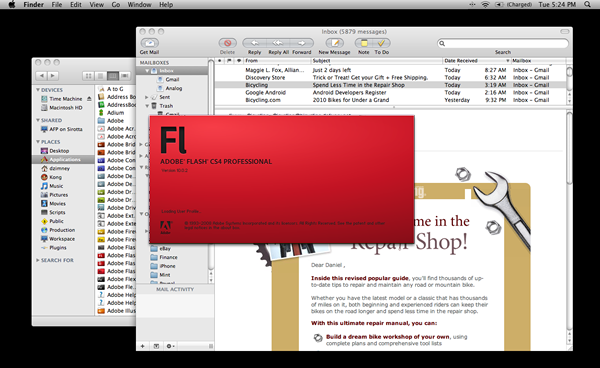
Adobe's asinine Flash loader
First off, I have to ask Adobe why? Why would it be important to have Flash steal the focus of my computer basically making it impossible to do anything else unless I work blind or carefully move my screens around the flash loader? What kind of user experience are you trying to deliver here? I’m already using the program and don’t need to be reminded of its magnificence as it’s loading. You’re an ass and need to get over yourself.
Part 2:
Apple’s part in the completely asinine use of focus is possibly, although definitely arguably, worse than that of Adobe. While Adobe completely hijacks your computer for a brief period of time is a completely dick move, Apple is just, well, stupid. You’ve probably noticed this before if you do a considerable amount of multitasking on your Apple computer and constantly have multiple Applications open at once. Somewhere at Apple, someone made the amazingly stupid decision to have Applications steal focus when they finish initializing. So lets say I’m looking at my email and open a link which in turn fires up Safari. As Safari is initializing I go back to my email and start a reply. In the middle of my typing Safari finishes initializing and steels my window focus cutting me off in the middle of my email. Thanks Apple, you complete ass.
Now this isn’t that big of a deal. The level of inconvenience is minimal, but there are two reasons this makes me want to choke Steve Jobs. First, to my knowledge, it is impossible to turn this nature off. I’ve scoured the Internets in search of a solution, a configuration setting, or some Apple or Shell script to run to change this. Nothing. If it was optional for Applications to behave in this way, I could deal with the idiotic default. Second, this behavior is totally and completely useless. It is only ever infuriating or otherwise useless. When would I ever want the program I’m loading to steel focus. Most people aren’t running defibrillator apps off their Apple computers that when fulling initialized need the program to take over for them immediately because otherwise someone might die. There has never and will never be a situation in which I will ever want an Application that does not currently have my focus to steel my focus just because it finished initializing. When I want to change my focus to a different application, I will do it. In the mean time do not hijack my focus. If this is an operating system bug that is difficult or impossible to solve, please forgive me and know that there is a great deal of interest in the community to have this problem resolved.
The general consensus on Mac OS X is that it is a very secure system. There is little to no threat of virus attacks and the operating system itself with the proper settings can be very secure. Unfortunately this isn’t as true as most of our perceptions would lead us to believe. I recently discovered that there is an extremely simple way to reset any administrative password on the OS X operating system. The only tool you need is a copy of the Mac OS X Install DVD. I won’t post the details here, but doing a quick Google Search results in some pretty shocking results; namely the Apple website has a very detailed page on how to change an administrative password in the case that you have “forgotten” yours, but has very poor details on how to prevent someone else from doing this to your computer. Don’t get me wrong, when the system is correctly put in place, Apple’s security is top notch. The problem is that by default these security measures are not implemented. Additionally, the existence and implementation of these measures are virtually hidden.
Before I begin on solutions to securing your machine, I must credit Orbicule. I recently found Orbicule’s Undercover software which is basically a “tracking” system for your laptop in the event your machine is stolen. It’s very affordable and I recommend it to anyone with a Mac laptop. Undercover makes a number of recommendations for making your computer more secure, which is what got the ball rolling for me.
To start there are a few basic settings you’ll want to put in place to make your machine more secure. In the “Security” panel of your “System Preferences” there are three check boxes you’ll want to be sure to have checked. These settings will lock your computer with your username/password.
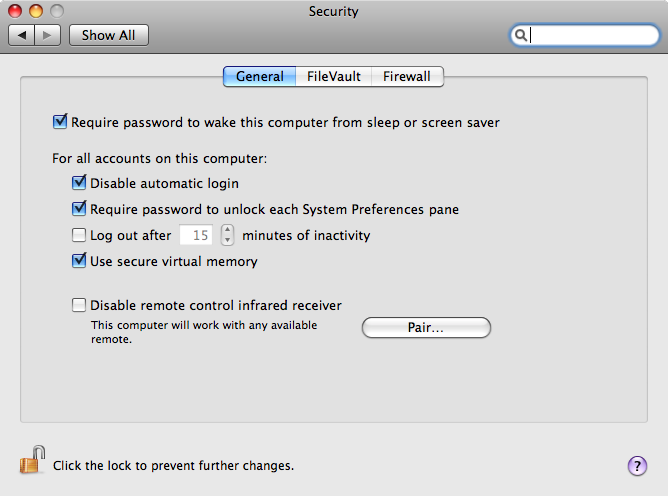
The first is the “Require password to wake this computer from sleep or screen saver” check box. This will make your computer lock any time it has been inactive long enough to put the computer to sleep or kick on the screen saver. More importantly, on a laptop it will require a password any time the lid is opened — essentially locking the computer once the lid is closed. Additionally, you can change the timing of your “Energy Saver” and “Screen Saver” in your “System Preferences” — personally I’ve just gotten into the habit of closing my laptop lid or starting my screen saver when I’m not using my computer.
The second check box to make sure you check is the “Disable automatic login” password. Without this, all of your other security measures are next to useless. Without the “Disable automatic login” checked all anyone needs to do to get into your machine is force it to reboot. This check box provides a login screen when you restart your machine.
The third item to check in the “Security” panel is the “Require password to unlock each System Preferences pane”. This will keep anyone from changes this preferences before they get locked out.
Now, as I wrote above, it is extremely easy to reset any administrative password on OS X — or any user password for that matter. So, the smart ones out there are wondering, “Why the hell did I require myself to enter my password at every turn if anyone can simply reset my password?” Good f***ing question. A more appropriate question would be, “How do I prevent anyone from resetting my password?”
The big Lock that Apple doesn’t advertise: the Open Firmware Password Utility
The way to prevent someone from resetting your admin password is to “lock the firmware”. The way to reset a password on OS X involves booting from an Mac OS X Install DVD. By locking your firmware, the system will be unable to boot from any drive other than the main hard drive without entering a password. The only way to reset that password is again to boot from the Mac OS X Install DVD. The only downside to this is that if you forget your password, you’re pretty well screwed. So this solution is not recommended for the absentminded.
The Apple website will tell you to insert your Mac OS X Install DVD and find the Firmware Password Utility on the disk. For OS X 10.5 and later this will not work. You will need to boot from the DVD. To do this, insert the CD into the machine and reboot. Hold down the ‘c’ key as the machine is booting. This will allow you to boot from a “optional disk”. In our case select the “Mac OS X Install DVD” and press enter. From here you will reach the “Welcome” screen, select your language and click the “–>” button. Now, you may get a prompt saying you are unable to install the operating system. Ignore this prompt or any others that may appear. At this point you should be able to see a set of menus at the top of the screen. Select the “Utilities” menu, choose “Firmware Password Utility” and proceed as directed. And there it is. That’s how you can securely lock you computer. By doing this the only way to use your computer would be to replace the hard drive — which makes you computer far more secure, and your data incredibly secure.
I’m not sure why Apple doesn’t advertise this more. Or rather, why they make it so incredibly simple to reset an administrative password. I could see making it easy to reinstall the OS and wipe the machine, but allowing anyone to reset the administrative password gives anyone, with the means, access to practically everything on your computer. It’s also incredibly disappointing that there’s such a minimal amount of documentation on how to run the Open Firmware Password Utility. There’s definitely a good deal of documentation for the utility pre-Leopard, but all of that is next to useless for 10.5. My guess is that, sadly, there’s more demand from Mac users to know how to reset an admin password that they’ve forgotten than there is to lock the firmware. Most people aren’t aware of how easy it is to get around the administrative passwords and there assume that even if a computer is stolen, their information is secure. We just don’t think of it.
Anyway, I just hope this helps someone out. And again, I strongly recommend Undercover for a laptop — or any Mac for that matter. It’s a (seemingly) very effective way of adding an extra level of security to a machine. I would not, however, recommend Undercover for the iPhone. Unless I’m missing something, it seems to be pretty useless. From my understanding the crook would have to open the application in order to be tracked. In that case MobileMe is an extremely effective solution, which I wish I could afford (justify) the $99/year to pay for it.
I’m starting to think I should change the title of my blog from “the Life of Zim” to “the Rant of Zim”.
It’s amazing how disconcerting Corporate America really is. Actually, I take that back, I’m not
amazed by it at all. It’s simply disturbing.
So, next up on my shit list is Adobe Systems Incorporated.
If you haven’t been following along on the blog, we were recently robbed. Someone came into our house and took our shit. It sucks. We’re still dealing with it a week later, and I’m sure we’ll still be dealing with it a month from now. Once again, it sucks. With that, I should point out that I do not blame Adobe for the burglary or think that it is their responsibility to compensate us for said burglary. My frustration with Adobe is rooted in their Customer Service, or rather lack there of. I’m am deeply disappointed by every aspect of their customer service that we have received up to this point.
A note for those of you that are unfamiliar with Adobe products and specifically CS4 or Creative Suite 4: You should know that the version of the Creative Suite that Laura had was Adobe Creative Suite 4: Design Premium, which costs $1,799. There is no comparable alternative to Adobe. For the line of work we are in, you use Adobe; it’s that simple. Now, it’s not Adobe’s fault for being the best at what they do, but I think it is important to note that they have a loose monopoly on the market. That said, between the high cost of their product and their dominance over the market, I believe, Adobe is in a greater echelon that ought to be held to a higher standard for the level of service they provide to their customers.
After the burglary, Laura bought a new computer. Upon attempting to install her copy of CS4 the software told her that the maximum number of machines (2) had been activated for her copy of CS4. The first activation was lost when the video card went out on her computer, which Apple replaced with a new MacBook Pro. The second when that replacement MacBook Pro was stolen a week ago.
CS4 comes with a License FAQ html file regarding possible issues you might run into. If you are on a Mac and have CS4 installed in the default location, you should be able to find the FAQ here. I was unable to find the FAQ on the Adobe website. The FAQ reads:
What happens if my computer is stolen or damaged and cannot be repaired?
If your computer is stolen, damaged beyond repair or the hard drive is completely re-imaged, the activation will be lost. In either case you can install and start using the Adobe product on your new computer, which will automatically detect the problem if you already had two computers activated. The activation process will guide you through the new activation, even if the prior computer is no longer available.
Both activation instances should totally be covered here. I’m sure that Apple re-imaged the laptop that was sent back, and the other installation was stolen with the computer. So naturally, after reading this, we thought, “Oh, great! Looks like there shouldn’t be any problem at all.” Wrong. Opening any program of CS4 prompts for activation. Upon activation a message displays saying that the maximum number of activations has been reached and that you have 30 days — the trail period length — to resolve the issue. There is no direction on how to solve the issue other than deactivating the other installations — which you must have the computer that the software is installed on to do — and in our case is impossible, but apparently covered according to the FAQ?
Next step: let’s call customer service. Hopefully you’ve never had the need to contact Adobe. Navigating their website and specifically their contact information is fairly difficult. Links are difficult to find, and over all it’s a counter-intuitive site architecture. Once you finally find the list of phone numbers, there’s the question of which number to call — in our case a tossup between Customer Service and Technical Support. I have yet to find any email address to contact, which is very surprising to me. I suppose with an email they can’t just put you on hold until you give up.
Preface to calls to customer service:
All of the service representatives we spoke to were in India. I don’t have any problem with Adobe’s customer service department being based in India. I don’t particularly like that Adobe is outsourcing as I would prefer they kept jobs in the United States, but fundamentally I can’t blame them for it. Outsourcing is a cheaper way of doing things and I can understand how a company that grossed $3.58 billion in 2008 would need to save money where it can. However, speaking to someone with an Indian accent — as well as someone from India speaking to someone with an American accent — can cause some serious communication barriers. Additionally, for the level of service we received, I want to say that Adobe’s India employees are so far removed from the company that the quality of service has suffered. Of course that assumes that this isn’t all intentional on Adobe’s part.
First Call
Laura calls customer service and explains the issue she’s having. The woman says, “Open CS4, click on the ‘Help’ menu and select ‘Deactivate…’.” Laura says, “No, the computer was stolen, I can’t do that.” The woman replies, “Open CS4, click on the ‘Help’ menu and select ‘Deactivate…’.” — “No. Do you understand that the computer was stolen!?” — “Open CS4, click on the ‘Help’ menu and select ‘Deactivate…’.” — “F***!!!”
Second Call
Laura calls customer service and explains the issue she’s having, hoping that this customer service representative will be a bit more competent, sure she just got a bad apple. After explaining the issue, she is told that the CS4 has been deactivated on the other computer and everything is gravy. Great. Laura asks for the woman’s name so that she can have some record of her conversation. “Nancy.” — “Okay… do you have an employee id number? Or is there a confirmation number for this call? Anything?” Nothing. She hangs up. Opens up CS4 on her laptop, and the issue still exists. — “F***!!!” — to our knowledge the woman flat out lied to us and in fact did absolutely nothing but put Laura on hold.
We wait a day.
Third Call
Laura calls customer service and talks to the first person that appeared to be of any use. She explains the issue, again. The customer service agent, Enrique, takes down much of her information to confirm her account and in the end says she’ll have to call back tomorrow because their “Activation Queue” is down he is unable to deactivate the installation of the other computer(s). At this point Laura insists on speaking to Enrique’s manager, which he resists. Finally she is placed on hold for a considerable amount of time until she gets the manager. The manger explains that the “Activation Queue” is down and she needs to call back tomorrow. Laura asks again for names or call numbers and is told that the customer service representatives are not allowed to give out their information for their own protection. Keep in mind they are in India. If they need to protect themselves from people getting upset enough to fly across the globe, they’ve got some serious problems. She gets no customer ids, no call numbers. Nothing. She asks to speak to the manager’s manger. No such thing. The line stops there.
Meanwhile…
…at Analog Interactive, my boss Shawn Sheely has been dealing with my installations of CS3 and CS4. Luckily, my CS4 had only been installed on one other computer (the one that was stolen) and so it activated fine. However, my CS3 had been on two machines previously — same story as Laura except I had a pixel out on my monitor instead of having the graphics card fail — Go Apple! Either way, Shawn had to call and deal with Adobe to sort out both copies, first so we could get CS3 working, and second to avoid future trouble with our copy of CS4. Shawn decided to call Technical Support instead of Customer Support. He called, talked to someone in India, and had the issue resolved almost immediately. Note, he made this call within two hours of Laura being told the “Activation Queue” was down and to call the next day.
Fourth Call
Laura now calls Technical Support. They add another activation to the account. CS4 runs fine. They give her a case number for the call. She also gets an email regarding the call with the case number. Everything is dandy.
WTF!?!?!
Adobe is a not a fortune 500 company, it only ranks 601. Even with such a low standing in the realm of the largest corporations in the world, I expected more form Adobe. I have been so utterly disappointed at this point that there is no possible way I will be able to look at Adobe the same. I thought they were one of the “good” corporate giants. Turns out I was wrong. Their customer service department purposefully gave us the run around three out of three times. If they actually knew how to do their job they simply could have told us to call Tech Support. How f***ing hard is that!? Why couldn’t we get a case number or an employee number for the customer service calls? Either Adobe has no idea how shitty their customer service is or they are promoting the behavior. It’s just bullshit.
Continued Ranting…
I hate that we, as a society, keep falling to the lowest common denominator like this. I would think, that a company in Adobe’s shoes, with such a huge dominance over a market, with such a high end product, would take that profit and continue to develop the best product possible with the best customer service available. You would think after spending $1799 on a software suite you would be treated like f***ing gold. Instead you have these huge corporate giants like Adobe or Microsoft or Apple, just to name a few, that seem to have a breaking point for integrity. Microsoft started out as amazingly innovative company that was the best at what they did; and slowly but ever surely they ended up taking nearly a decade to develop a worthless piece of shit like Windows Vista. As for Apple, I generally believe they have a superior product with, relatively, superior customer service. However, with their growing success I truly feel that Apple is starting to slip down the same path — specifically the bullshit that has come with the success of the iPhone and their affiliation with AT&T.
The best customer service I have ever received was from the Zippo Manufacturing Company. Zippo has made a vastly superior product with the most outstanding customer service I have ever come across in the course of my life. Their lighters are great. So great in fact that Zippo stands by the quality of a Zippo and will replace any Zippo if it breaks or fails for any reason, ever. I used to have a Zippo; I lost it to an airport post 9/11 — don’t get me started on the bullshit of Airport Security. At one point the hinge of the Zippo broke. There’s a pin that holds the top of the Zippo on, and that pin broke. I could have sent the Zippo in and had them repair it, but since it had some sentimental value, I didn’t want to send it through the mail. Instead, I emailed Zippo, telling them I just needed the pin and could probably fix it myself. Immediately, no questions asked, Zippo mailed me a package with two replacement pins, a few extra flints, some info on Zippo, and a prepaid envelope that I could use if I wished to send in the Zippo to be repaired. They also sent a keychain what was an encased penny, and the casing was engraved. It said: “The penny you’ll never spend to replace a Zippo.” They didn’t ask for any proof that I owned the Zippo, they didn’t care. To them I was a customer that needed service and they provided the absolute best service possible, going above and beyond my requests, and it didn’t cost me a thing. I bought the Zippo for $20 and it got me the best customer service in the world. Why should I expect any less from anything else I buy, especially if it costs nearly 100 times as much? I do wonder though, what would Zippo be like if 90% of all people who owned lighters only bought Zippo’s. Would Zippo still have the same level of integrity? One would hope so, but based on experience, I wouldn’t bet on it.
[For the quick answer to fix Notes in the Mail app from failing skip to the final paragraph]
I love Apple and most all of there products, which is why it pains me so much when they royally f*** up the simplest things. Some time ago I started trying to use Notes in the Mail app to help keep myself more organized. I was also curious if I could sync my Mail notes with my iPhone Notes (which I the time you couldn’t). Soon I realized that Notes did not work properly in the Mail app. Pressing the “New Note” button or selecting “New Note” from the File menu did nothing. It simply would not work. Upon investigation more online I could only find that some people were experiencing the issue and some were not, but absolutely nothing on any sort of fix.
With the release of the 3.0 firmware for the iPhone and the new capability of syncing iPhone Notes with Mail Notes, I started up on the quest that I had left behind months prior. I was able to sync with my iPhone but trying to look at any of the notes in Mail would just cause mail to hang while trying to load the Note. Basically I’d have to force quit. This time I felt quite determined to find the problem. I began digging through my Library folder and anything else I could think of that could have possibly effected my Application. Oh, one thing to note here, I knew that it wasn’t global issue on my machine, logging in as a different user I could use the Notes functionality in Mail just fine.
So I kept digging and diggin infuriated by the fact that Notes would not work with my user only. Finally I came across a post in the Apple Discussion pages. And what did it say!?
I just read another post that says you need to have the font “Marker Felt” installed and activated for notes to work correctly. I tried it and it works!
Are you f***ing kidding me!? That’s the problem? A font wasn’t active? For months I’ve been frustrated by Apple’s inability to use a default font that isn’t as obscure as “Marker Felt”. How about if Marker Felt isn’t available you just use some other Sanserif font? How difficult can that be? Instead the whole functionality of Mail completely fails.
So. If you’re having the same issue, that is, Notes in Mail is not working for you. Try this solution. Activate the font: Marker Felt. To do this open Font Book, in the upper left hand corner select “All Fonts”. Scroll down on the middle column until you find “Marker Felt”, right click and select “Enable Font”. Done. Notes should work now (assuming there isn’t some other asinine issue with Mail).
I’ve finally found the Eclipse prefs file that stores the local file path to linked resources (linked libraries). Linked resources are basically shortcuts to files/folders on your local system. Buried in the Workspace/.metadata/.plugins/loc.eclipse.core.runtime/.settings/ folder (on OS X), the loc.eclipse.core.resources.prefs file contains the absolute paths to those linked libraries.
 A few months ago I began working with Ant tasks in Eclipse. Specifically, I was using fdtkit along with Ant in Eclipse to generate JavaDocs for my Actionscirpt 2.0 libraries using as2api. For the most part fdtkit is a fabulous tool, or rather toolbox for generating JavaDocs and numerous other tasks with the use of Ant. However, the issue that I very soon found myself confronted with was documenting classes from linked libraries in Eclipse. Normally I will set up a project with a src containing code specific to that project, and then make use of linked libraries to make use of code from other projects/api’s. When running an Ant task to create my JavaDocs I was unable to intelligently identify the paths to my linked libraries to add to the documentation.
The way Eclipse and FDT handle linked libraries is through the IDE and the .project file found in the root of the project folder. Opening the .project file, you might see something like this (assuming you are using linked libraries):
<link>
<name>core</name>
<type>core</type>
<locationURI>FP8</locationURI>
</link>
Looking at the link object, you will see two important pieces of information the name property and the locationURI property. Now the name property represents the name associated with the linked library (obviously) and then there’s the locationURI. The locationURI is a reference to the linked resource. The problem here is where the hell is the identity of that locationURI? In the Eclipse IDE you can select a linked library in the Explorer view and then examine it with the properties view. Here you will see the value for the resolved location, which is the full, absolute path to the linked library on your local system. But how the hell to I get that property with Ant? How to I access it all? Well, I’ve been asking that question for quite some time, scouring the Internet and finding nothing. Today, I found my answer.
Determined to know how linked resources were being saved on my system I began digging deep in the my Eclipse folder to find property in some buried file. Note, I’m running Eclipse 3.3 on OS X. I would imagine the path is similar on Windows, but probably not exactly the same (I’m guessing it’s pretty damn close to the same in Linux). Anyway…
The file location is: ${your_eclipse_workspace_folder}/.metadata/.plugins/loc.eclipse.core.runtime/.settings/loc.eclipse.core.resources.prefs
This file looks something like:
pathvariable.FP7 = /Users/local/Workspace/fdtkit/lib/FP7
pathvariable.FP8 = /Users/local/Workspace/fdtkit/lib/FP8
pathvariable.FP9 = /Users/local/Workspace/fdtkit/lib/FP9
So now, through Ant task it is possible to have your build.xml (relative to your project) parse the .project file of the project for linked libraries and with the locationURI parameters to grab the absolute path to the class library from the loc.eclipse.core.resources.prefs file.
Please feel free to contact me if you have any questions regarding this post. I’m sure this isn’t the most straight forward explanation of what I’ve found here, but I’m a little to jacked up on coffee to form clear coherent thoughts right now.
Note: Linked resources are Workspace specific. Different workspaces have a different set of linked resources.
Well we just finished up one hell of a project at Analog. It was a long hard haul to the finish line, but considering the time frame we had (three weeks), I’d say we did a pretty impressive job for a two man shop.
Here’s the goods: Real Stories
Title is almost like a David Byrne movie 
Currently the software for this is only available for Windows XP Professional (which I hate… hate’s a strong word… I poop on Microsoft). Anyway, this is pretty awesome. Apparently these guys are working of Mac version called Lux. Definitely gonna want to jump on this when it’s available.
How to Make a Cheap Multitouch Pad – Click here for more free videos
I swear, any time I think that Google is lacking any way, they seem to show me up. I absolutely love those guys/gals.
So today after I got home I’m started locanizing my photos on my computer. I’m currently using iPhoto, which I don’t totally love, but it gives me most of what I need. Since Laura and I want Asia, I’ve been keep my photos updates (fairly regularly) on Picasa, Google’s photo app. Now I’d been pretty sure that Google and iPhoto worked pretty seamlessly together, and sure enough they do. Google has developed a desktop app, called Picasa Web Albums Uploader (for Mac), for uploading photos that is complete with an iPhoto plugin. Once the uploader is installed, simply select an album in iPhoto and select File -> Export… Next, select the Picasa Web tab and presto, you can add your photos to a new or existing ablum. Super slick.
Now all I need is an easier way to upload from my phone (iPhone). There are a few workarounds and right now it works fine to sync my phone with with my iPhoto library and upload from there, but it’d be cool if I could do a batch upload straight from the phone. All in due time, I hope. I know I’m not the only one looking for this feature. If there’s a demand and Google’s got time, then I’m sure they’ll deliver. Assuming Apple isn’t letting them to keep people off Picasa and on MobileMe or whatever they’re selling. Don’t get me wrong, I love Apple, but ever since they teamed up with AT&T they’ve gotten a little insane with iPhone.
Damn the man, save the Empire.